Configuring Your Application
In the previous chapter, you compiled and ran a doorbell program. But it only ran once. On a real PLC, the sense-control-actuate cycle repeats continuously on a fixed schedule. In this chapter, you will add a configuration to schedule the program and a timer to make the buzzer pulse automatically.
Add a Timer
A doorbell that buzzes constantly is not very useful. Let’s add a timer so the buzzer pulses — turning on for a short duration, then turning off.
Open main.st and replace its contents with:
PROGRAM main
   VAR
      Button : BOOL;
      Buzzer : BOOL;
      PulseTimer : TON;
   END_VAR

   PulseTimer(IN := NOT Button, PT := T#500ms);
   Buzzer := PulseTimer.Q;

END_PROGRAM
What Changed
We added a timer on delay (TON) function block:
PulseTimer : TONdeclares an instance of the standardTONfunction block.TONturns its outputQtoTRUEafter a specified delay.PulseTimer(IN := NOT Button, PT := T#500ms)calls the timer.INis the enable input (TRUEwhen the button is not pressed), andPTis the delay duration (500 milliseconds).Buzzer := PulseTimer.Qreads the timer’s output.QbecomesTRUEonce the timer has been running for 500 ms.
Add a Configuration Block
Now add a configuration to tell the runtime how to schedule the
program. Add the following below the existing END_PROGRAM:
PROGRAM main
   VAR
      Button : BOOL;
      Buzzer : BOOL;
      PulseTimer : TON;
   END_VAR

   PulseTimer(IN := NOT Button, PT := T#500ms);
   Buzzer := PulseTimer.Q;

END_PROGRAM

CONFIGURATION config
   RESOURCE res ON PLC
      TASK plc_task(INTERVAL := T#100ms, PRIORITY := 1);
      PROGRAM plc_task_instance WITH plc_task : main;
   END_RESOURCE
END_CONFIGURATION
What the Configuration Does
The configuration block introduces three layers:
- CONFIGURATION
The top-level container for your application. Every IEC 61131-3 application has exactly one configuration. Here it is named
config.- RESOURCE
Represents a processing unit (a CPU or core). The resource named
resrunsON PLC, wherePLCis the name of the hardware target defined by the runtime environment.- TASK
Defines a scheduling policy. The task named
plc_taskruns every 100 milliseconds at priority level 1. This means the runtime will execute the sense-control-actuate cycle 10 times per second.
The line:
PROGRAM plc_task_instance WITH plc_task : main;
creates an instance of the main program, names it
plc_task_instance, and binds it to plc_task. Every 100 ms, the
runtime reads the inputs, runs main, and writes the outputs.
Tip
For a deeper look at how these layers fit together, see Program Organization.
Run the Updated Program
Now that the timer and configuration are in place, run the updated program:
Click Run Program above the
PROGRAM mainline.The IronPLC Run output panel shows the variables updating in real time. After a moment, you should see output like:
Scan cycle: 10
---
  Button : BOOL = FALSE
  Buzzer : BOOL = TRUE
  PulseTimer : TON = <TON>
BuzzerisTRUEbecause the timer’s outputQturned on onceButtonhad beenFALSEfor 500 ms. The panel lists the program’s variables; the timer instance appears as its type, and its members (Q,ET) are not listed.Click Stop above the
PROGRAMline to end execution.
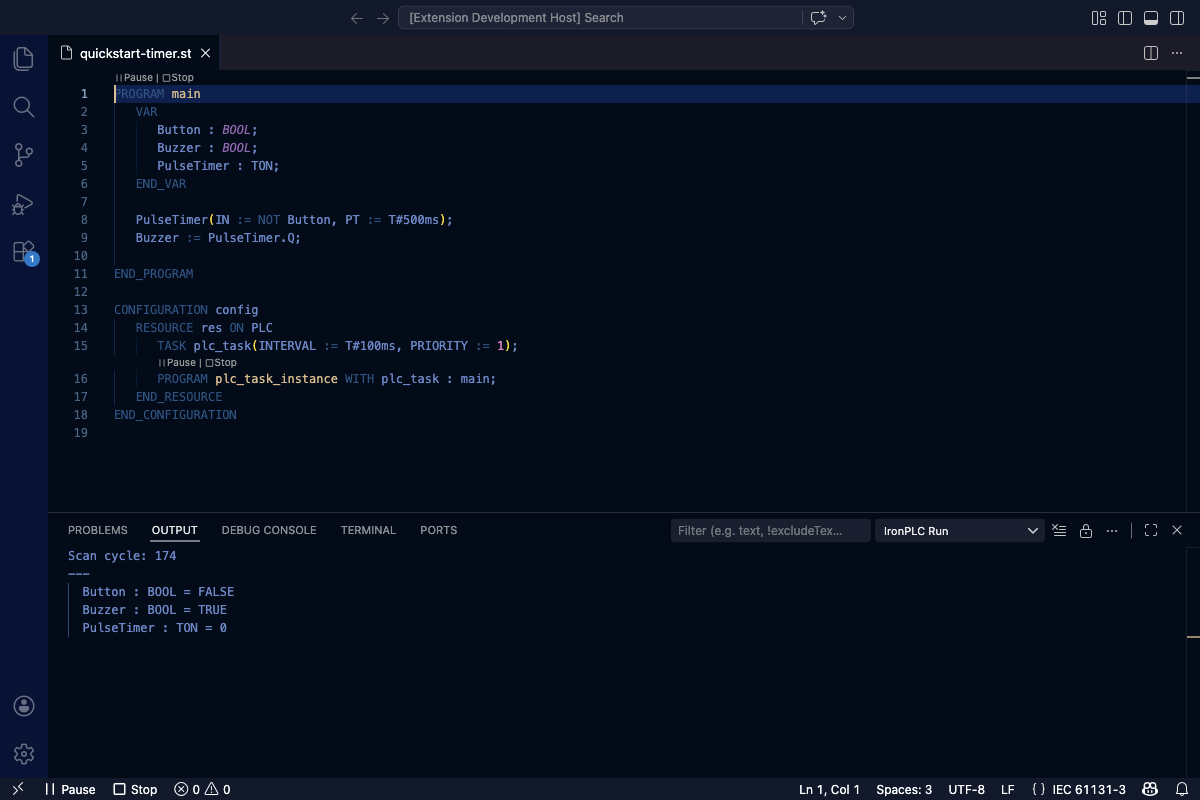
The IronPLC Run panel showing the program variables after the TON fires.

The timer program in action: scan cycles advancing and PulseTimer variables updating.
The timer’s elapsed time (ET) shows how long it has been running.
After enough scan cycles, Q becomes TRUE and the buzzer turns on.
Next Steps
Your main.st file now contains everything needed for a working
IEC 61131-3 application. Before you grow it, take a look inside it while it
runs.
Continue to Debugging Your Program.