Settings Reference
The IronPLC extension provides configuration settings to customize its behavior. Access these settings through:
(Windows/Linux)
(macOS)
Then search for “ironplc” to find all extension settings.
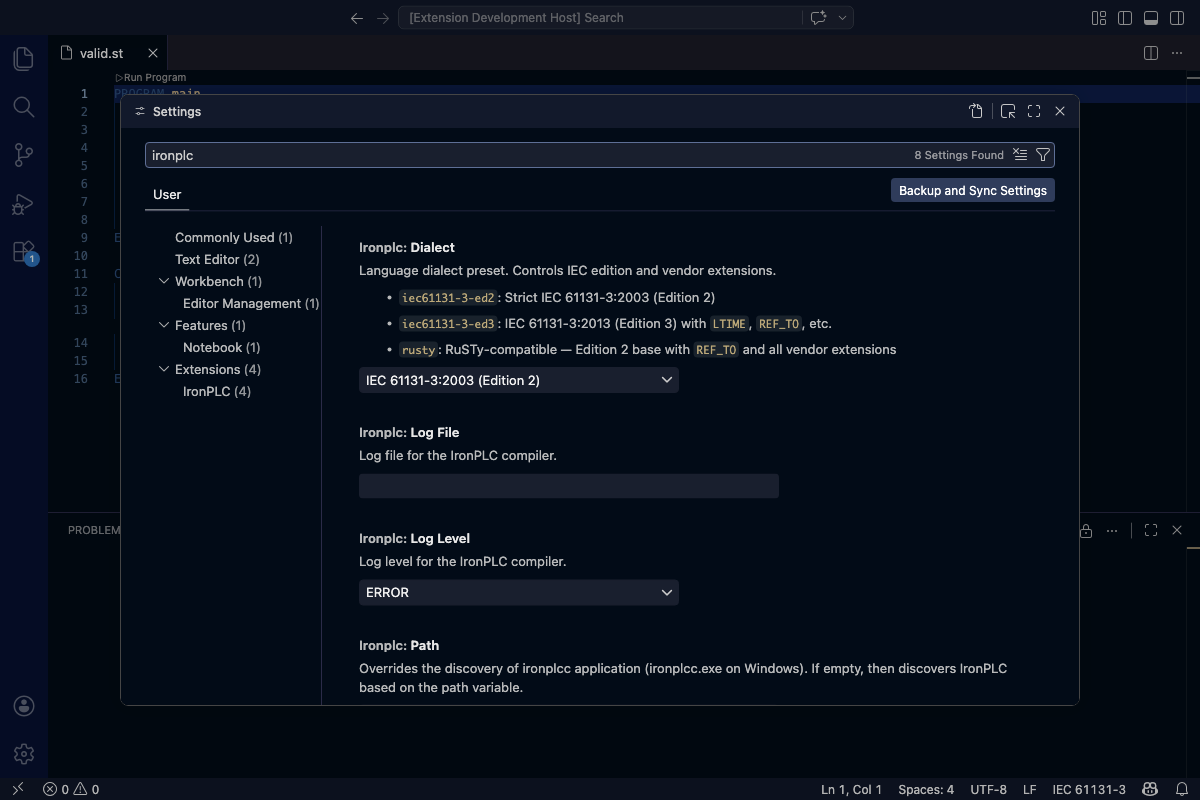
The VS Code settings panel with IronPLC settings.
Available Settings
ironplc.path
- Type:
String
- Default:
Empty (auto-discovery)
Specifies the path to the ironplcc executable. When empty (the default), the extension automatically searches for the compiler in standard locations.
Use this setting when:
The compiler is installed in a non-standard location
You want to use a specific version of the compiler
Auto-discovery is not finding your installation
Example values:
Windows:
C:\Program Files\IronPLC\bin\ironplcc.exemacOS:
/usr/local/bin/ironplccLinux:
/home/username/ironplc/ironplcc
ironplc.debugServerPath
- Type:
String
- Default:
Empty (auto-discovery)
Specifies the path to the ironplcvmd debug server. When empty (the default), the extension looks for the server next to the ironplcc compiler it discovered.
Use this setting when the debug server is installed apart from the compiler, or when E0007 reports that the server was not found.
Example values:
Windows:
C:\Program Files\IronPLC\bin\ironplcvmd.exemacOS:
/usr/local/bin/ironplcvmdLinux:
/home/username/ironplc/ironplcvmd
See Debugging for what the debug server does.
ironplc.logLevel
- Type:
Enum
- Default:
ERROR- Values:
ERROR,WARN,INFO,DEBUG,TRACE
Controls the verbosity of compiler logging. Higher levels include all messages from lower levels.
ERROR: Only error messages (quietest)WARN: Warnings and errorsINFO: Informational messages, warnings, and errorsDEBUG: Detailed debugging informationTRACE: Maximum verbosity (most detailed)
Increase the log level when troubleshooting issues with the extension or compiler.
ironplc.logFile
- Type:
String
- Default:
Empty (no file logging)
Specifies a file path where the compiler should write log messages. When empty, logs are not written to a file.
This setting is useful for:
Capturing detailed logs for bug reports
Debugging issues that occur intermittently
Analyzing compiler behavior over time
Example: /tmp/ironplc.log or C:\Users\username\ironplc.log
Note
The log file can grow large when using verbose log levels. Remember to disable file logging or delete the log file when troubleshooting is complete.
ironplc.dialect
- Type:
Enum
- Default:
iec61131-3-ed2- Values:
iec61131-3-ed2,iec61131-3-ed3,rusty,codesys,twincat
Selects the language dialect preset. A dialect controls the IEC 61131-3 edition and a default set of extensions.
iec61131-3-ed2: Strict IEC 61131-3:2003 (Edition 2). No extensions.iec61131-3-ed3: IEC 61131-3:2013 (Edition 3) withLTIME,REF_TO, etc.rusty: RuSTy-compatible — designed for compatibility with code from RuSTy-based PLC environments.codesys: CODESYS-compatible — Edition 2 base withREF_TOand the extensions that the CODESYS IDE accepts.twincat: TwinCAT-compatible — Edition 2 base with the extensions Beckhoff TwinCAT shares with CODESYS. Unlikecodesysit does not enable theREF_TOreference extensions, since TwinCAT usesREFERENCE TO(bound withREF=) andPOINTER TO(bound withADR()), which it enables instead.
This setting corresponds to the --dialect command-line option documented in
ironplcc.
See Enabling Dialects and Features for background on dialects and Edition Support for the full list of edition-gated features.
Settings in settings.json
You can also configure these settings directly in your settings.json file:
{
  "ironplc.path": "/custom/path/to/ironplcc",
  "ironplc.debugServerPath": "/custom/path/to/ironplcvmd",
  "ironplc.logLevel": "DEBUG",
  "ironplc.logFile": "/tmp/ironplc-debug.log",
  "ironplc.dialect": "rusty"
}